Wasteland King (WK) Guide — Strategy, Hospital Filling & Point Calculators
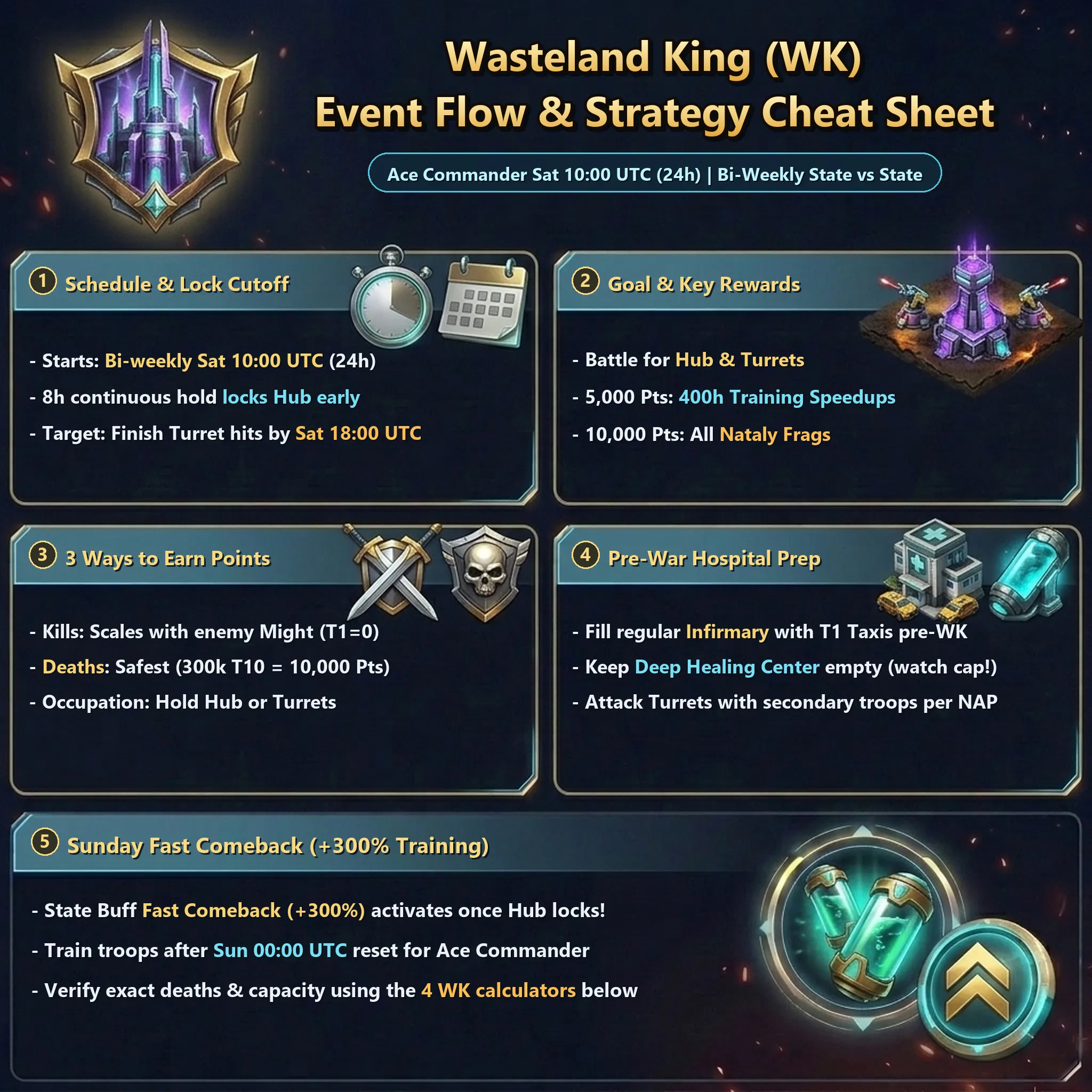
Wasteland King (WK) is a bi-weekly State-vs-State (KvK) event alternating with Valiant Conquest (VC) (Japanese guide), starting every Ace Commander Saturday at 10:00 UTC (equivalent to 19:00 JST).
While the headline goal is defending your home State’s central Zenith Tech Hub (Hub) against invading States, for most players WK is also a goldmine for personal rewards and Fast Comeback (+300%) training boosts used to win Ace Commander Sunday.
Use the guide and 4 built-in calculators below to plan Hospital Filling, calculate exact troops to send for personal milestones or Ace Commander points, verify Deep Healing Center capacity, and track recovery before the next WK.
Event Flow Overview
Section titled “Event Flow Overview”If you are not participating in frontline Hub/Turret defense or cross-State raids, the standard beginner workflow is simple:
- Before
10:00 UTCSaturday: Fill your regular Infirmary completely using T1 Vehicles (Taxis).
(Fill only the regular Infirmary—leave your Deep Healing Center empty.) - After
10:00 UTCSaturday: Once your State’s NAP terms are announced, attack an enemy State’s Turret (ideally using secondary/non-main troops, since dead/Deep-Healing troops are temporarily sidelined) to earn Death Points. - After
00:00 UTCSunday (and once your home Hub’s owner is finalized): Confirm your State Buff shows Fast Comeback (+300%), then mass-train troops to rack up huge Ace Commander Sunday points.
Rewards
Section titled “Rewards”Check Wasteland King > Personal Rewards in-game for your State bracket’s exact rewards. Key prizes include:
- 400 Hours of Training Speedups
- 5★ Hero Choice cards or 5★ Perfect Fragments
- Nataly Fragments
All Training Speedups unlock by 5,000 Personal Points, while Nataly fragments require 10,000 Personal Points.

How to Earn Personal Points
Section titled “How to Earn Personal Points”There are 3 ways to score WK Personal Points:
Enemy Kill Points
Section titled “Enemy Kill Points”Earned by killing or wounding enemy-State troops. Points scale closely with troop Might—for instance, 60 pts per T10 killed (T1 troops grant 0 pts).
The biggest source of Kill Points is defending your State’s Hub/Turrets against incoming rallies, though attacking enemy Turrets for Death Points also generates a small amount.
Hitting Sanctuaries or gathering marches inside Mud (Black Soil) also grants Kill Points.
Death Points
Section titled “Death Points”This is the primary point source for the vast majority of players.
You earn Death Points based on the tier and quantity of your troops that die in battle.
Whatever points you still need after Kill and Occupy Points—or to build your Fast Comeback cap for Ace Commander—are earned by hitting enemy Turrets under NAP terms until your march wipes.
Occupy Points
Section titled “Occupy Points”Earned by garrisoning troops inside a home or enemy Zenith Tech Hub or Turret.
Reaches maximum value at 120 minutes, awarding up to 2,000 Personal Points.
Usually earned by signing up for State Defense (below), though sometimes gained by holding enemy structures as well.
Pre-Event Preparation
Section titled “Pre-Event Preparation”Good preparation before 10:00 UTC saves millions of resources and boosts your point efficiency.
Should You Join State Defense?
Section titled “Should You Join State Defense?”Every State organizes defense differently via Alliance/State leadership. If you meet the minimum troop tier (typically T9+ or T10+) and want Occupy Points, sign up when asked. General expectations:
- Hold the required troop tier
- Be online and responsive between
10:00 UTCand18:00 UTCon Saturday
Defenders temporarily move into the Host Alliance to reinforce assigned Turrets/Hubs, pull back on command, or join counter-rallies—so pay close attention to Alliance Mail and chat calls.
Hospital Filling (Infirmary Filling)
Section titled “Hospital Filling (Infirmary Filling)”Before WK opens at 10:00 UTC Saturday, fill your regular Infirmary to max capacity using T1 Vehicles (Taxis).
Here is why pre-filling your regular Infirmary is so important:
flowchart TD
    subgraph Prep["Preparation Phase (Before WK Starts)"]
        direction TB
        Taxi["Attack a Gathering Tile with T1 Vehicles (Taxis)"] --> Injured["Troops Wounded"]
        Injured --> NormalHospital["Regular Infirmary (Fill to Max Capacity)"]
    end

    NormalHospital ==>|"Event Starts"| MainTroops

    subgraph Event["Live Event (During WK)"]
        direction TB
        MainTroops["Attack Turret or Hub with Main Troops"] --> Dead["March Wiped Out"]
        Dead --> CheckHospital{"Is Regular Infirmary Full?"}

        CheckHospital -->|"YES (Recommended)"| DeepHealing["Sent to Deep Healing Center (Heal with Nano Potions)"]
        DeepHealing --> Best["Best: High Death Pts / No Resources Used"]

        CheckHospital -->|"NO"| NormalHospital2["Sent to Regular Infirmary (Requires Resources & Long Heal Time)"]
        NormalHospital2 --> Bad["Suboptimal: Low Death Pts / Heavy Resource & Speedup Cost"]
    end

    style Best stroke:#0f0,stroke-width:4px
    style Bad stroke:#f00,stroke-width:4px
Troops that land in your regular Infirmary cost massive Food/Wood/Steel/Gas and Speedups to heal (or take up to 2 weeks to recover ~70% free using Heal Now).
By contrast, troops sent to the Deep Healing Center heal using Nano Potions earned passively over time and from Daily Quests—costing zero resources.
Just as importantly, troops entering the regular Infirmary give zero Death Points. While some deaths still occur even with an empty Infirmary, you will have to throw far more troops away to hit personal milestones!
Usually, defenders or strong players leave their Alliance early, put a strong march on a resource tile, and announce “Suicide Tile” coordinates in State Mail/Chat—simply attack that tile with enough T1 Taxis to cap your Infirmary.
If nobody has posted one, ask in State Chat for someone to hit a gathering march you send out.
Calculate Required Deaths
Section titled “Calculate Required Deaths”Use the calculator below to simulate Ace Commander Sunday training vs. WK Fast Comeback (labeled Post-War Boost in the calculator UI): enter your target Ace Commander points, training buffs, and troop tiers to see exact WK deaths, Speedups, and resources needed.
Enter any one value to automatically recalculate the other 3 fields.
| Cost Buff | Food | Wood | Steel | Gas |
|---|---|---|---|---|
| None | 32.3M | 8.16M | 1.11M | 0.09M |
| On (-25%) | 22.8M | 5.76M | 0.78M | 0.06M |
Check Deep Healing Center Capacity
Section titled “Check Deep Healing Center Capacity”Calculate how many troops you can safely send into your Deep Healing Center without overflowing into permanent losses, based on your capacity and Aftershock %.
Check your Aftershock value with your Military Talent active under Commander Info > Buff Info > Troop Buffs.
| Field First Aid | Troops to Send | Permanent Losses | Recovery Rate | Fast Comeback Cap |
|---|---|---|---|---|
| Active | 181,401 | 31,401 | 82.7% | 9,795,654 |
| Inactive | 203,556 | 53,556 | 73.7% | 10,992,024 |
After the Event Starts
Section titled “After the Event Starts”Follow this decision flowchart once WK goes live at 10:00 UTC Saturday:
flowchart TD
    Start(("Event Starts")) --> JoinDefense{"Join State Defense? (T10+ etc.)"}
    JoinDefense -->|"YES"| HostGuild["Move to Host Alliance"]
    HostGuild --> Defend["Garrison Assigned Turret or Hub (Earn Occupy Pts)"]
    JoinDefense -->|"NO"| CheckNAP{"Is There a NAP?"}

    Defend --> DefenseEnd["Defense Ends or Rotate Out"]
    DefenseEnd --> CheckNAP

    CheckNAP -->|"YES"| NapRules["Check NAP Terms (No Heroes, T11 Cap, etc.)"]
    NapRules --> AttackTower["Attack Enemy State Turrets (Earn Death Pts)"]

    CheckNAP -->|"NO"| FreeWar{"Is Your State Winning?"}
    FreeWar -->|"YES"| AttackTower
    FreeWar -->|"NO"| DefendTower["Attack Occupied Home Hub or Turrets (Earn Death Pts)"]

    AttackTower --> CheckPoints{"Reached Target Points? (Personal / Ace Pts)"}
    DefendTower --> CheckPoints

    CheckPoints -->|"NO"| Continue["Continue Attacking"]
    CheckPoints -->|"YES"| Production["After Sunday 00:00 UTC: Verify Fast Comeback (+300%)"]
    Production --> Train["Mass-Train Troops (Earn Ace Commander Pts)"]
If Joining State Defense
Section titled “If Joining State Defense”Leave your Alliance and join the Host Alliance before your scheduled shift (or before 10:00 UTC Saturday).
Check Alliance Mail/Chat for which troop-type Turret or Hub you are assigned to.
As soon as shields drop at 10:00 UTC, “Attack” (garrison) your assigned structure using the designated troop type without heroes, since a top player will activate SP Stay (unless told otherwise).
Because marches to Hubs/Turrets move slowly, use Fast March so your troops arrive before the structure fills up!
If fellow defenders are waiting to get their 2 hours of Occupy Points, ask Host Alliance leadership before pulling out once you hit 120 minutes.
If Not Defending (or After Rotating Out)
Section titled “If Not Defending (or After Rotating Out)”When a NAP Is Active
Section titled “When a NAP Is Active”Check State Chat or Battle Chat for the exact NAP Terms before marching, and attack enemy Turrets strictly within those limits (such as no heroes, march caps for T11+, etc.).
Sample WK NAP Announcement
Section titled “Sample WK NAP Announcement”WK NAP TERMS・ No scouts, No attacks on HUB・ Allowed hits -Mud HQs, Tiles.・ NO Rallies, NO Heroes.・ Allowed hits: T1-10 no march limit; T11 is 200,000; T12-T13 is 100,000What each line means:
・ No scouts, No attacks on HUB
Do not scout anything or attack the central Zenith Tech Hub.
(Scouting is treated as hostile intent—never scout during a NAP.)
・ Allowed hits -Mud HQs, Tiles.
Sanctuaries and gathering marches inside Mud (Black Soil) are fair game.
Never relocate onto Mud to get closer to a Turret—always park on clean land outside the Mud border before attacking. Even half your Sanctuary touching the Mud edge counts as inside Mud:

・ NO Rallies, NO Heroes.
Send solo marches only, and leave all hero slots empty.
・ Allowed hits: T1-10 no march limit; T11 is 200,000; T12-T13 is 100,000
Send unlimited T1–T10 troops, max 200,000 T11s, and max 100,000 T12–T13s per march to avoid wiping the defenders too quickly.
When There Is No NAP
Section titled “When There Is No NAP”Your State Is Invading Successfully
Section titled “Your State Is Invading Successfully”If your State holds the enemy’s Turrets, do not attack them. (Note: in 3-State matches, you may have a NAP with one enemy State and free-war with the other—check chat carefully.)
When your State captures an enemy Hub, your home Hub gets shielded, and if home Turrets are left empty an enemy might flip one—rally or solo any enemy-occupied home Turret until it flips back, then recall if a teammate captures it.
Your State Is Being Invaded
Section titled “Your State Is Being Invaded”Hit any enemy-occupied home Turrets with everything you have to farm Death Points and help retake them.
Calculate Remaining Troops to Send
Section titled “Calculate Remaining Troops to Send”Enter your current red-text scores from Wasteland King > Personal Rewards to calculate exactly how many troops you still need to send to hit 5,000 or 10,000 Personal Points.
*Enter the numbers shown at the bottom (in red) under Wasteland King > Personal Rewards.
Pre-filling your Infirmary significantly reduces required assault troops. Check this only if marching with an empty Infirmary.
If you expect more Enemy Kill Pts, add that estimate to 'Enemy Kill Pts' above (currently: 0).
| Milestone | Add'l Death Pts | Personal Pts | Troops Needed |
|---|---|---|---|
| Up to 5,000 Pt | 5,500,000 | 5,100 | 122,223 |
| Up to 10,000 Pt | 18,000,000 | 10,100 | 400,000 |
After Sunday Reset (00:00 UTC)
Section titled “After Sunday Reset (00:00 UTC)”After 00:00 UTC Sunday (once your home Hub owner is finalized), tap the State Buff icon in the bottom-right corner of your Sanctuary screen to verify Fast Comeback (+300%) and check your remaining Training Cap.
Every troop trained consumes Training Cap equal to its Might (e.g., 1 T10 troop uses 60 cap). Burn Training Speedups and resources alongside Ace Commander Sunday!
Provided your Deep Healing Center did not overflow, roughly 80% of your sacrificed troops wait safely inside Deep Healing while Fast Comeback lets you train 120% new troops—meaning once you finish healing, you end up with 80% recovered + 120% newly trained = 200% (a net +100% troop Might gain)!
Deep Healing Center Recovery
Section titled “Deep Healing Center Recovery”Troops inside the Deep Healing Center are healed using Nano Potions (displayed as Nano-Med in the calculator below) or Diamonds.
When your regular Infirmary is empty, you earn 7,500 Nano Potions/hour passively plus 1,000 Nano Potions per Daily Quest point claimed.
Healing cost per troop starts at 4 Nano Potions for T1, rising by +2 per tier (T9 = 20), then 24 for T10, etc.
Because regular Infirmary fullness slows passive Nano Potion income proportionally, start healing your regular Infirmary Taxis right away! (Because regular Infirmary slots stay occupied until healing completes, as long as you do not speed-finish them early, you can even start healing your Taxis before you finish scoring WK Death Points.)
Estimate Healing Duration & Diamonds Needed
Section titled “Estimate Healing Duration & Diamonds Needed”Check whether passive recovery + Daily Quests will clear your Deep Healing Center before the next WK (every other Saturday at 10:00 UTC / 19:00 JST)—and estimate how many Diamonds it takes during Diamond Expert if you need to speed it up:
💡 How to use the Deep Healing Calculator
Since Diamond Expert falls on regular Saturdays & Sundays, use this timing to spend Diamonds if natural recovery and daily quests won't finish before the next WK.
You can check 'Nano-Med Required' inside your Deep Healing Center screen.
Enter your average daily quest activity points (Max 190, F2P Max 170, all chest rewards at 150).